

PANEL RESERVATIONS
Hello fans! To mitigate crowding, make our panels more accessible to fans, and prevent anyone from having to wait hours and hours for a chance to attend a panel or screening we will be offering reservations to attend select events.
| Event Name | RSVP Goes Live |
| Anime NYC Cosplay Masquerade (August 23rd) | August 5 @ 7:00pm ET |
| New Panty & Stocking screening and talk panel with TRIGGER (18+) (August 22nd) | August 5 @ 7:00pm ET |
| “One-Punch Man” Special Event – The Hero!! (August 23rd) | August 5 @ 7:00pm ET |
| Yu-Gi-Oh! 25th anniversary panel with VA Kenjiro Tsuda (August 23rd) | August 6 @ 7:00pm ET |
| Star Wars: Visions Volume 3 (August 22nd) | August 6 @ 7:00pm ET |
| DAN DA DAN Panel with English Voice Cast (August 23rd) | August 6 @ 7:00pm ET |
| Netflix Presents: Sakamoto Days, Splinter Cell, Blue Eye Samurai and More! (August 21st) | August 7 @ 7:00pm ET |
| WIND BREAKER Panel (August 22nd) | August 7 @ 7:00pm ET |
| SPY x FAMILY Special Panel ft. Kenichiro Matsuda and Emiri Kato (August 22nd) | August 7 @ 7:00pm ET |
YOU MUST HAVE A BADGE VALID FOR THE DAY OF THE PANEL IN ORDER TO MAKE A RESERVATION
IF YOUR BADGE IS NOT VALID FOR THE DAY OF THE PANEL (ie: you have a Sunday badge, but the panel is on Saturday) THAT PANEL WILL NOT APPEAR FOR YOU ON THE RESERVATION PAGE.
While we expect them to fill quickly, they will remain open until the actual panel date and time so that if anyone cancels their reservation, it can be reclaimed. Cancelled reservations are automatically re-added into inventory, so we encourage you to check back throughout.
In order to make a reservation, you must either login to your Leap Conventions account or have access to your badge confirmation email from [email protected]
If you cannot find your email, contact [email protected] from the email address that was used to purchase the badge and it can be re-sent.
Plan ahead—inquiries sent on the day of the reservation opening may not be answered in time.
If someone else purchased your badge for you, please contact them and ask them to send you a copy of the confirmation email.
PRO TIPS
If you haven’t answered the pop-up interest questions on your badge purchase, you will need to do so before you’re able to make reservations. You can do this early by opening up your confirmation page.
If you purchased multiple badges, please be aware that reservations must be made one at a time for each badge that you purchased. You can share your confirmation email with the other badge holders so they can make their own reservations, or you can make them all yourself. Whichever method you choose, WE HIGHLY RECOMMEND ASSIGNING A NAME OR NICKNAME TO EACH BADGE AHEAD OF TIME SO IT’S EASIER TO KEEP TRACK.

TO MAKE A RESERVATION:
- Open your Anime ANYC confirmation email from [email protected]
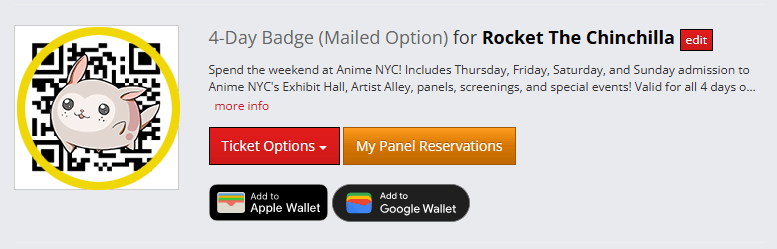
- Scroll down and click the <strong”>GRAY BOX that says “CLICK HERE TO VIEW YOUR ORDER ONLINE AND MANAGE YOUR SCHEDULE”

- Due to high web traffic, and to help ensure fans have time to complete the process, there will be a virtual queue system. You will automatically be placed in the virtual waiting room when you click on the “VIEW YOUR ORDER ONLINE AND MANAGE SCHEDULE” button between 6:00pm and 6:59pm. There is no need to queue more than a few minutes early as everyone in the waiting room prior to 7:00pm will be placed in the queue in random order.
Anyone arriving after 7:00pm will be placed at the end of the virtual queue in the order that they arrived. - Once you’re able to access your registration, click the ORANGE BUTTON that says “My Panel Reservations” (this button will not appear until August 5th at 7:00pm).
CLICKING ON IT AFTER 7:00PM WILL PLACE YOU IN THE VIRTUAL WAITING ROOM. IF YOU ARE ON THIS PAGE PRIOR TO 7:00PM PLEASE REFRESH THE PAGE TO ENSURE YOU ARE IN THE WAITING ROOM.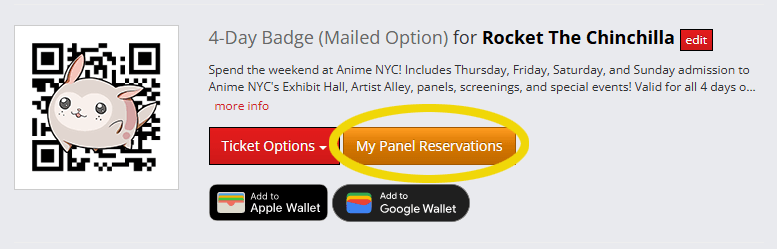
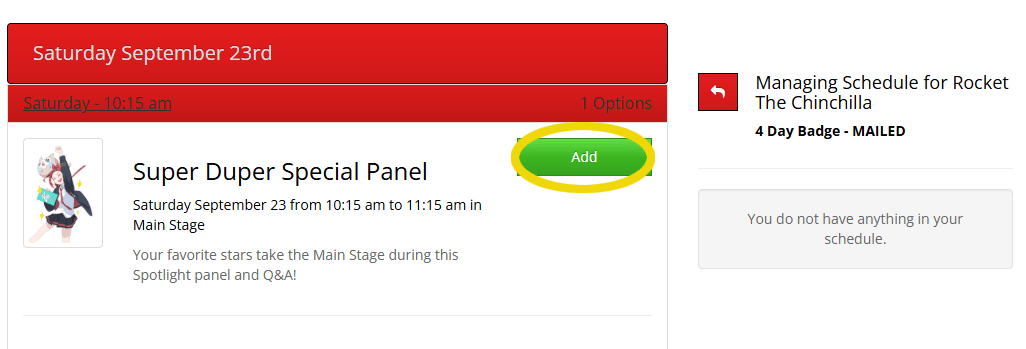
- Open the day of the reservation you wish to make (the option will not appear until 7:00pm on the day panel reservation goes live) and click the GREEN BOX that says “Add”. You will see the Panel you selected added to your confirmation page.
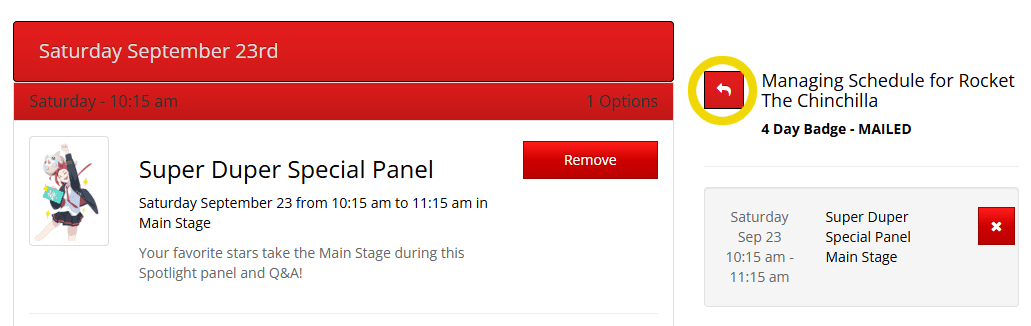
- Click the RED BOX with the WHITE ARROW (or simply hit your browser’s “Back” button) to return to the previous screen
- Repeat the steps for all other badges that need a reservation
- You’re all set!
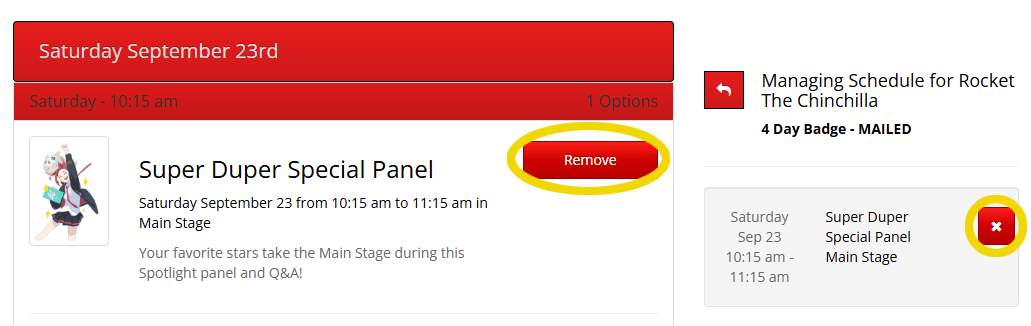
Do NOT click the Red X or the Red Remove button unless you wish to cancel your reservation. WE CANNOT RE-ADD ANY REMOVED RESERVATIONS IF ALL RESERVATIONS ARE CLAIMED.
To check in to the panel that you have made a reservation for, please have the QR code associated with the badge you made the reservation for on your phone or printed out and ready to scan.
MAIN STAGE PANELS
The queue will start after the preceding panel has finished loading. If you arrive earlier and the queue for the preceding panel is still being loaded in, you will be asked to leave the area, please follow instructions given to you by staff and security.
The queue for the Main Stage will be in Hall C.
STANDBY LINES – MAIN STAGE
Standby lines will be organized when there is available physical space. This will be after the preceding panel has started, so you may be asked to come back later if you arrive too early. Please be aware that there will be a cap on the number of fans permitted in the standby line.
Please follow the instructions of our staff, crew, and security, even if it involves leaving the area due to the standby line’s full capacity. While our aim is to accommodate as many attendees as possible to enjoy a panel, the safety and well-being of everyone will always be the top priority.